Carrier TMS
Fill every truck. Run every trip.
Carrier TMS: dispatch, load finding and fleet software.
Find loads that fit, put the right truck and driver on them, and see what each trip earned.
No subscription fee for the software.


The MOVAELO transportation management system (TMS) gives carriers a workspace for finding loads, dispatching vehicle moves, coordinating drivers and trucks, and following jobs through delivery and settlement.
Running a truck is a stack of small jobs: find a load, tell the driver, check the ETA, collect the receipts, work out what the trip earned. MOVAELO puts the whole stack in one workspace, so the day gets shorter.
Find loads, dispatch drivers, keep up with maintenance and see what your fleet earns. Drivers record expenses with the trip. Your office checks the ETA, the paperwork and the settlement in the same place.
A day in dispatch.
- 1
Find a load that fits a truck heading home.
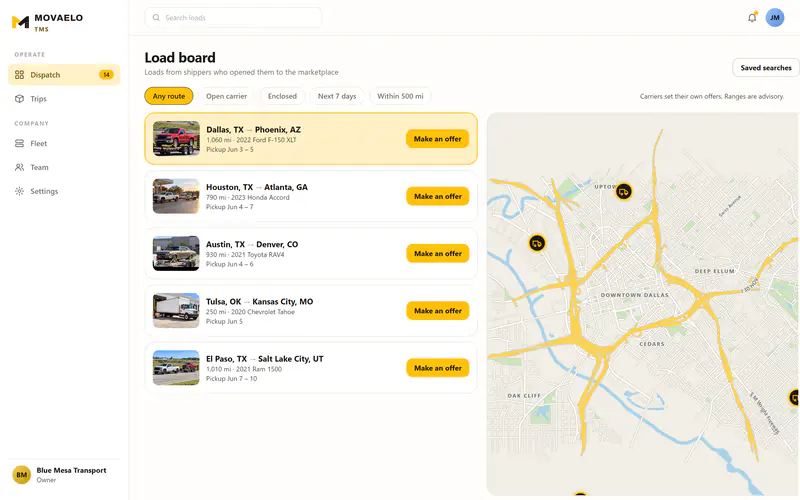
The load board: open vehicle moves with route, vehicle, pickup window and a Make an offer button. - 2
Check the load against your trucks and drivers, and see the estimated profit.

Compare trucks and drivers and see the estimated profit before you bid. - 3
Assign the awarded job to an eligible driver and truck.

Drivers and trucks as rows, with each one’s jobs and a panel to review a new assignment. - 4
Watch the trip and the arrival ETA.

One trip: timeline, route, driver and truck, photos and chat. - 5
Close it out with the signed bill of lading.

The electronic bill of lading, with condition checks and signatures, stays with the trip.


Find work
Loads that fit your route and your trucks.
Use the marketplace as your load board, and bring your own customers too.
- Search by route and equipment.
See pickup windows and a Make an offer button on every load.
- Bid with the right truck.
Match the vehicle and route to equipment and drivers before you bid.
- Your customers, your rates.
Invite dealers and shops you already work with and keep your agreed lane rates.


Recommended loads for the fleet, with rate, miles and the trucks that have room. Browse open jobs by route and submit a bid.
Dispatch
See what is moving and what is waiting.
Every job by stage, and one action to put a driver and truck on it.
- Jobs by stage.
Needs planning, assigned, in transit and delivery review.
- Driver and truck as rows.
See open spaces on each truck before you assign.
- Arrival and departure ETAs.
Plan the next handoff. ETAs are estimates.


All jobs by stage, with a one-click action to assign a driver and truck. Available, active and pending jobs in one list.
See what each trip earned.
| What you need to know | What MOVAELO brings together |
|---|---|
| What did this job earn? | The agreed rate and job-related payment records. |
| What did it cost to run? | Driver expense reports and receipts for fuel, tolls and meals, kept with the trip. |
| How is the fleet doing? | Earnings, expenses and profitability across trips and reporting periods. |
| What do I owe the driver? | Internal driver settlement records help reconcile what the carrier owes its driver. The driver settlement and the carrier payout are separate parts of the workflow. |
| Where is the paperwork? | Invoices, payment records, proof of delivery and transport documents with the job. |

Resources
Guides to the MOVAELO platform
Questions about the carrier TMS
What is the MOVAELO TMS?
The MOVAELO transportation management system gives carriers a workspace for dispatching vehicle moves, coordinating drivers and trucks, and following jobs through delivery.
Can I use MOVAELO as an owner-operator?
Yes. Owner-operators can use the mobile app to find and bid on jobs and work through pickup, transport and delivery.
Which carriers use the fleet TMS?
Carriers managing multiple trucks use the TMS for fleet dispatch. A single-truck owner-operator can run jobs from the mobile app.
Can one person be the carrier admin and dispatcher?
Yes. One person can handle administration and dispatch, which suits smaller teams.
Can drivers record expenses and receipts?
Yes. Trip expense and receipt records stay with the trip, which makes reconciliation easier.
Does the TMS help with maintenance and document follow-up?
Yes. The carrier workspace supports reminders for maintenance and documents.
Get early access
Free for dealerships, carriers and drivers.
- Free for dealers, carriers and drivers
- No subscription. No demo to sit through.
Last updated